Using pyvar.com's REST API Directly: Auth, Endpoints, Tiers, and Limits
A practical guide to the raw REST API underneath pyvar-client and pyvar-jupyter — for anyone calling it with curl, from a language other than Python, or who just wants to know exactly what's happening under the SDK.
pyvar-client and pyvar-jupyter (covered in their own companion guides) are the recommended way to use pyvar.com from Python. This piece is for everything else: calling the REST API directly with curl, from another language, or just understanding exactly what the SDK is doing on your behalf.
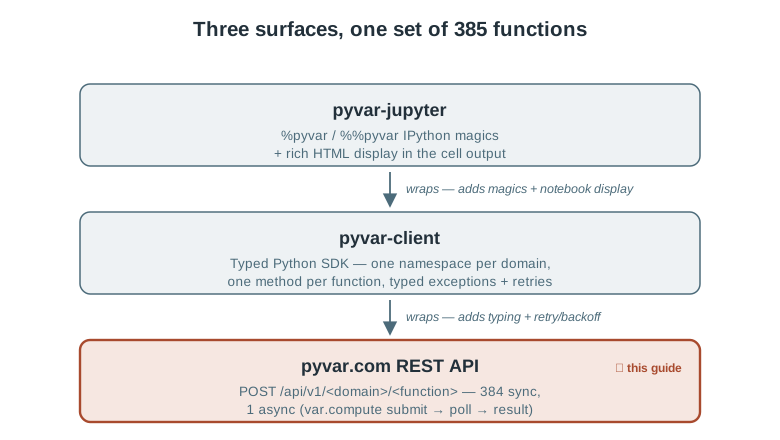
Get an account: register, sign in, create an API key
There's no password and no credit card for the free tier — just an email. The same call both registers a new address and signs a returning one in:
curl -X POST https://www.pyvar.com/api/v1/auth/register \
  -H "Content-Type: application/json" \
  -d '{"email": "you@example.com"}'
Returns 202 Accepted immediately (whether or not the email exists yet, or is disposable/suppressed — the response shape never reveals which, so the registration flow can't be used to probe email validity). A link arrives by email (single-use; a sign-in link for an existing account is valid for 30 minutes, at most one is sent every 5 minutes per address). Clicking it hits:
curl "https://www.pyvar.com/api/v1/auth/verify?token=..."
which returns a 60-minute session token. ("Sign in with Google" on the homepage returns the same thing.) The session is only for managing keys:
{"access_token": "eyJ...", "tier": "free"}
Use it to create an API key — the credential you actually keep:
curl -X POST https://www.pyvar.com/api/v1/auth/api-keys \
  -H "Authorization: Bearer eyJ..." -H "Content-Type: application/json" \
  -d '{"name": "laptop"}'
# {"key": "pyvar_...", "prefix": "pyvar_AbCd1234", "expires_at": "...", ...}
The key is shown once; pyvar stores only its hash. Every call then sends Authorization: Bearer pyvar_... (the Python client and the MCP server read it from PYVAR_API_KEY). A key lasts a year, you can hold up to five at a time, and DELETE /auth/api-keys/{id} (or the dashboard) revokes one immediately. A key cannot create or revoke keys; only a signed-in session can. The dashboard at dashboard.html does all of this without curl: it creates your first key on first sign-in and lists, creates and revokes keys after that. Lost a key? Sign in again and create a new one. (A session token, or a key, both work as a bearer credential on every endpoint.)
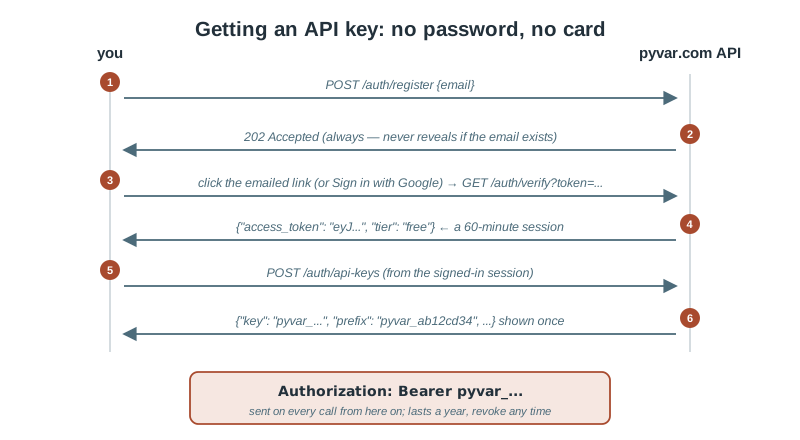
Your first computation
Every one of pyvar's 385 functions is a POST under /api/v1/<domain>/<function_name>, taking a JSON body matching that function's Pydantic schema and returning a JSON result:
curl -X POST https://www.pyvar.com/api/v1/market-risk/historical_simulation_var \
  -H "Authorization: Bearer pyvar_..." \
  -H "Content-Type: application/json" \
  -d '{
    "returns": [0.01, -0.02, 0.015, 0.008, -0.011],
    "portfolio_value": 1000000,
    "confidence_level": 0.99
  }'
The 8 domain prefixes: /market-risk, /credit-risk, /derivatives, /liquidity, /operational, /portfolio, /regulatory, /alm. The full, live list of all 385 functions and their exact request/response schemas is browsable at /docs — FastAPI's auto-generated OpenAPI UI, always in sync with what's actually deployed since it's generated from the same route definitions this article describes.
The one async endpoint
POST /api/v1/var/compute is the exception: a real Monte Carlo job dispatched to pyvar's Celery/SQS worker fleet. It returns a task_id immediately, not a result:
curl -X POST https://www.pyvar.com/api/v1/var/compute \
  -H "Authorization: Bearer pyvar_..." -H "Content-Type: application/json" \
  -d '{"portfolio_value": 1000000, "returns": [...], "n_simulations": 100000}'
# {"task_id": "..."}

curl "https://www.pyvar.com/api/v1/var/result/<task_id>" \
  -H "Authorization: Bearer pyvar_..."
# {"status": "success", "result": {...}}   (or "pending" / "failure")
pyvar-client's client.var.compute() and pyvar-jupyter's %pyvar var.compute both just automate this submit-then-poll loop — nothing happens here that isn't visible in a plain curl exchange.
Tiers and what they actually control
A session token carries your tier as a claim, decoded once per request with no database lookup. An API key looks your tier up (cached for up to 60 seconds), so an upgrade applies to a key almost immediately:
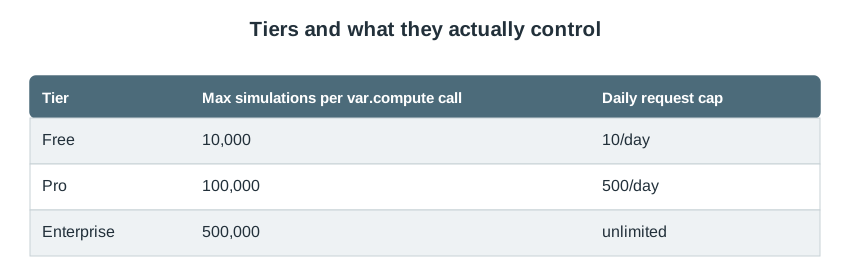
The daily cap is a single account-wide bucket shared across all 385 endpoints — not 385 separate quotas. Exceeding it returns 429 Too Many Requests with a Retry-After header telling you exactly how many seconds until the window resets:
curl -i ...
HTTP/1.1 429 Too Many Requests
Retry-After: 43201
{"detail": "Rate limit exceeded. Please retry later."}
Requesting more simulations than your tier allows on var.compute fails fast, before anything is queued:
{"detail": "Your 'free' tier allows a maximum of 10,000 simulations. Requested: 50,000."}
— a 403 Forbidden, not a 422, since the request is well-formed; it's just not something this account is entitled to.
Pro's monthly caps, and what happens if you hit one
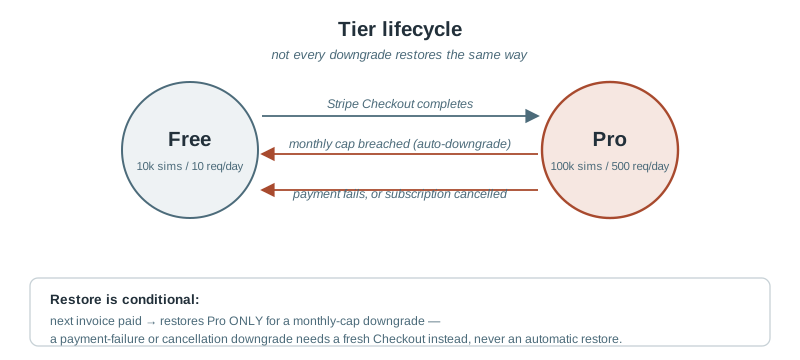
Beyond the daily request cap, Pro accounts carry two monthly caps that don't just throttle — breaching either one hard-downgrades the account to Free for the rest of the billing period:
- 5,000 requests/month, checked generically across every endpoint.
- 2,000,000 simulations/month, checked only against
var.compute(the one endpoint that tracks simulation counts at all).
Hit either one, and the response is a 403 explaining exactly what happened and when it resolves:
{"detail": "Your Pro plan's monthly request limit has been reached. Your account has moved to the Free plan for the rest of this billing period; full Pro limits resume automatically at your next billing date."}
This isn't a silent downgrade — it writes an audit record and sends a notification email — and it isn't permanent: the account is automatically restored to Pro the next time a subscription invoice is paid successfully, with no action needed from the user.
Upgrading to Pro
curl -X POST https://www.pyvar.com/api/v1/billing/checkout \
  -H "Authorization: Bearer pyvar_..."
# {"checkout_url": "https://checkout.stripe.com/..."}
Redirect to that URL — it's Stripe's own hosted Checkout page, so pyvar's infrastructure never touches card details directly. After payment, Stripe redirects back to pyvar's dashboard with a ?checkout_session_id=... query parameter, which the frontend exchanges for a fresh token:
curl "https://www.pyvar.com/api/v1/billing/checkout/complete?session_id=cs_..."
# {"access_token": "eyJ...", "tier": "pro"}
If you use a session token, that exchange step matters: your existing JWT's tier claim doesn't update itself just because Stripe processed a payment — the database changes immediately (via a webhook Stripe calls server-to-server), but an already-issued token keeps whatever tier it was minted with until you fetch a new one. GET /billing/checkout/complete is that one bridge — without it, a successful subscription would be real in the database but invisible to a session token until it was replaced. API keys do not need this step: they read the tier from the database, so a key created before the upgrade is Pro as soon as its short cache entry lapses.
What's deliberately out of scope today
Enterprise tier is a manual, sales-assisted process — there's no self-service checkout for it, by design. And Pro's entire value proposition today is the higher daily/monthly caps above; no priority queue, no extended result retention yet — both explicitly deferred to a later phase, not silently missing.
Try it
# 1. Register or sign in (check your email for the link)
curl -X POST https://www.pyvar.com/api/v1/auth/register \
  -H "Content-Type: application/json" -d '{"email": "you@example.com"}'

# 2. Verify (from the emailed link) -- copy the access_token (a 60-minute session)
curl "https://www.pyvar.com/api/v1/auth/verify?token=..."

# 3. Create an API key with that session -- copy the key, it is shown once
curl -X POST https://www.pyvar.com/api/v1/auth/api-keys \
  -H "Authorization: Bearer eyJ..." -H "Content-Type: application/json" -d '{}'

# 4. Compute something
curl -X POST https://www.pyvar.com/api/v1/market-risk/historical_simulation_var \
  -H "Authorization: Bearer pyvar_..." -H "Content-Type: application/json" \
  -d '{"returns": [0.01,-0.02,0.015,0.008,-0.011], "portfolio_value": 1000000}'
Sources
api/routes/auth.py— registration, verification, JWT issuance.api/middleware/auth.py— JWT decoding,TokenPayload, per-tiermax_simulations.api/middleware/rate_limit.py— daily and monthly request-count caps, the shared-scope design, downgrade trigger.api/routes/var.py— the asyncvar.compute/var.resultendpoints, the monthly simulation-count cap.api/routes/billing.py— Stripe Checkout flow, the JWT-staleness bridge, webhook-driven tier changes.config.py— the actual numeric limits (rate_limit_free_daily,rate_limit_pro_daily,rate_limit_pro_monthly_requests,rate_limit_pro_monthly_simulations) quoted directly.main.py— router registration, the 8 domain prefixes,/docsOpenAPI UI.docs/publications/pyvar-client-guide-medium-article.md,pyvar-jupyter-guide-medium-article.md— the companion SDK/notebook guides this piece complements without repeating.